Service to obtain one or more workfloos depending on the filters applied
| Time | Status | User Agent | |
|---|---|---|---|
Retrieving recent requests… | |||
Intro
This API works to retrieve all queries carried out to your different workfloos with the execute service by a provided filter.
You can get from one to 10,000 elements, if the API response has more elements you should consider using pagination.
Important Points
Pagination Parameters
The next two pagination parameters are optional to do the request, but we recommend you to use it to reduce the time in the request.
- itemsPerPage, number of items by page, should be an integer between [1, 10000], if you do not send it, by default 100 elements are returned
- page, the page index, should be an integer greater than 0
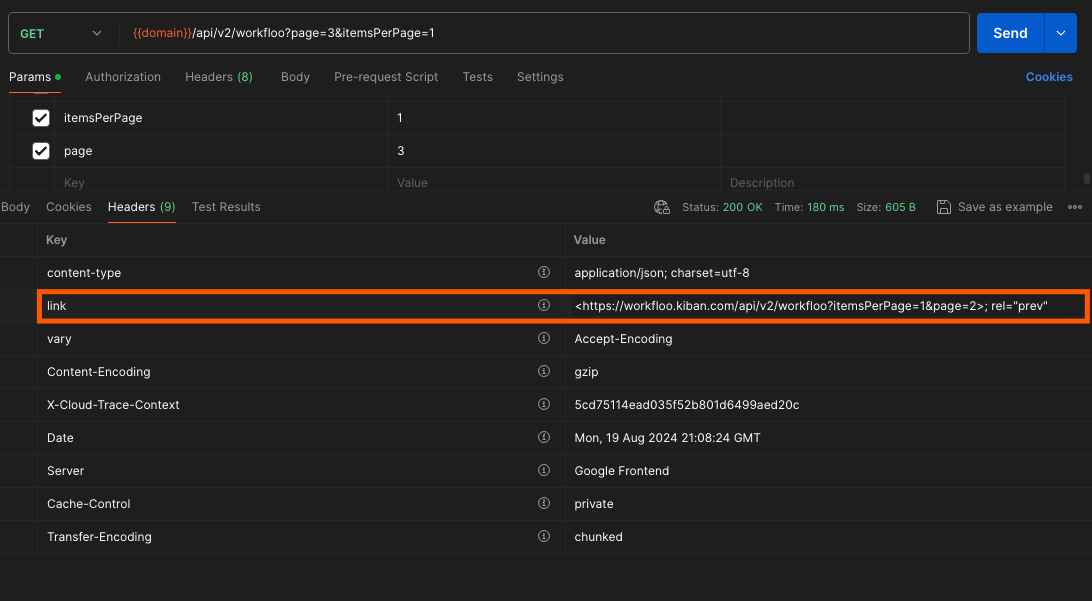
Kiban follows the link header REST API pagination standard. In our response section you can see the headers that kiban returns
Filter by period
The next two parameters are necessary if you want to filter by a period:
- from
- to
Both parameters are a string date and the format must comply with format ISO 8601.
Extra parameters to make an exact query
There are extra parameters that can be added to the request, with these parameters you can make a more exact match, see the description below to see the possible data to send
- origin
- status
- name
- _id
- nodes.form.searchableBy.rfc_pf
- nodes.form.searchableBy.first_name
- nodes.form.searchableBy.second_name
- nodes.form.searchableBy.last_name_1
- nodes.form.searchableBy.last_name_2
- nodes.form.searchableBy.rfc_pm
- nodes.form.searchableBy.company_name
- format
- content
- labels
Errors
The next error can be returned if there is a problem with the request body or the execution of this service:
Errors by an incorrect format:
{
    "itemsPerPage": "ERROR_QUERY_PARAM_FORMAT; should be integer value, [1, 1000]",
    "page": "ERROR_QUERY_PARAM_FORMAT; should be integer value, > 0",
    "from": "FORMAT_ERROR; Invalid date format. The format must comply with format ISO 8601",
    "to": "FORMAT_ERROR; Invalid date format. The format must comply with format ISO 8601"
}
Response
Kiban will return a list of items with the next structure:
[
    {
        "id": "66be765ed1536c6bbada7092",
        "name": "BC PF",
        "createdAt": "2024-08-15T15:42:54.437-06:00",
        "modifiedAt": "2024-08-15T15:43:03.901-06:00",
        "status": "SUCCESS",
        "currentNodeName": "buró de crédito persona física 01",
        "origin": "API"
    },
    {
        "id": "66aa84883b9e00ba9f3d6c2a",
        "name": "WF BC PF por kiban",
        "createdAt": "2024-07-31T12:38:00.711-06:00",
        "modifiedAt": "2024-07-31T12:38:39.572-06:00",
        "status": "SUCCESS",
        "currentNodeName": "Reporte de crédito persona física por kiban",
        "origin": "FRONT"
    },
    {
        "id": "66aa83153b9e00ba9f3d6c26",
        "name": "WF BC PF por kiban",
        "createdAt": "2024-07-31T12:31:49.463-06:00",
        "modifiedAt": "2024-07-31T12:33:32.373-06:00",
        "status": "SUCCESS",
        "currentNodeName": "Reporte de crédito persona física por kiban",
        "origin": "KIBAN_CLOUD"
    },
    {
        "id": "669fd98b602f75dedf08f772",
        "name": "RCE BC PF",
        "createdAt": "2024-07-23T10:25:47.058-06:00",
        "modifiedAt": "2024-07-23T10:28:23.335-06:00",
        "status": "SUCCESS",
        "currentNodeName": "árbol de decisión 01",
        "origin": "KIBAN_CLOUD"
    },
    {
        "id": "66635d72ff6314f0c315397f",
        "name": "BC PF",
        "createdAt": "2024-06-07T13:20:18.001-06:00",
        "modifiedAt": "2024-06-07T13:20:34.85-06:00",
        "status": "SUCCESS",
        "currentNodeName": "buró de crédito persona física 01",
        "origin": "KIBAN_CLOUD"
    }
]- id, identifier of the request.
- name, workfloo's name
- createdAt, date time with the exact moment of creation.
- finishedAt, date time with the exact moment of finalization.
- status, status of the request
- currentNodeName, current node
- origin, the origin of execution
Link pagination header
Kiban will return a header in the response calle link, this header provides the URL for the previous and next page of results:
- The URL for the previous page is followed by rel="prev".
- The URL for the next page is followed by rel="next".